How to Use Sleep Tracking Data to Optimize Your Evening Rout
Learn how to use sleep tracking data to optimize your evening routine and wake up refreshed. Discover actionable steps and start improving tonight.
How to Use Sleep Tracking Data to Optimize Your Evening Rout
Introduction
How to use sleep tracking data to optimize evening routine is the shortcut busy professionals need to turn restless nights into productive mornings. By turning raw numbers into actionable habits, you can shave minutes off wind-down time, improve sleep quality metrics, and wake up ready to hit the ground running. In this guide we’ll walk through concrete steps- from spotting evening distractions in your sleep cycle analysis to configuring a smart alarm based on REM patterns- so you can build a data-driven pre-sleep routine that actually works.

Analyze Your Sleep Cycle Data to Spot Evening Distractions
The first answer-first step is simple: look at your nightly sleep stage breakdown and identify when you’re most likely to be disrupted. Most wearable sleep insights break the night into light, deep, and REM stages; the moments right before deep sleep are especially sensitive to external stimuli.
When you open your sleep tracking dashboard, focus on three metrics:
- Sleep latency - how long it takes you to fall asleep after you get into bed.
- Nighttime awakenings - count and duration of each interruption.
- REM onset timing - the clock time when your first REM episode begins.
If latency consistently spikes after 10 pm, you’re probably still engaged in a stimulating activity (checking email, scrolling social feeds). Frequent awakenings at 2 am often correlate with bright screens or loud household noises. A delayed REM onset can indicate that your circadian rhythm is misaligned with your bedtime.
[!NOTE]
Even a 10-minute reduction in sleep latency can improve overall sleep quality metrics by up to 5 percent, according to sleep science literature.
Use these insights to create a personalized wind-down checklist:
- Turn off blue-light devices 30 minutes before your target sleep time.
- Dim ambient lighting to a warm hue once latency exceeds 5 minutes.
- Log any caffeine or alcohol intake after 5 pm in your evening habit tracking sheet.
When you consistently apply the checklist, the data will show a downward trend in latency and fewer mid-night awakenings. The Nidoria app makes this loop seamless by automatically visualizing latency trends alongside your nightly notes, so you can see cause and effect in real time.
Set Smart Alarm Parameters Based on REM Trends
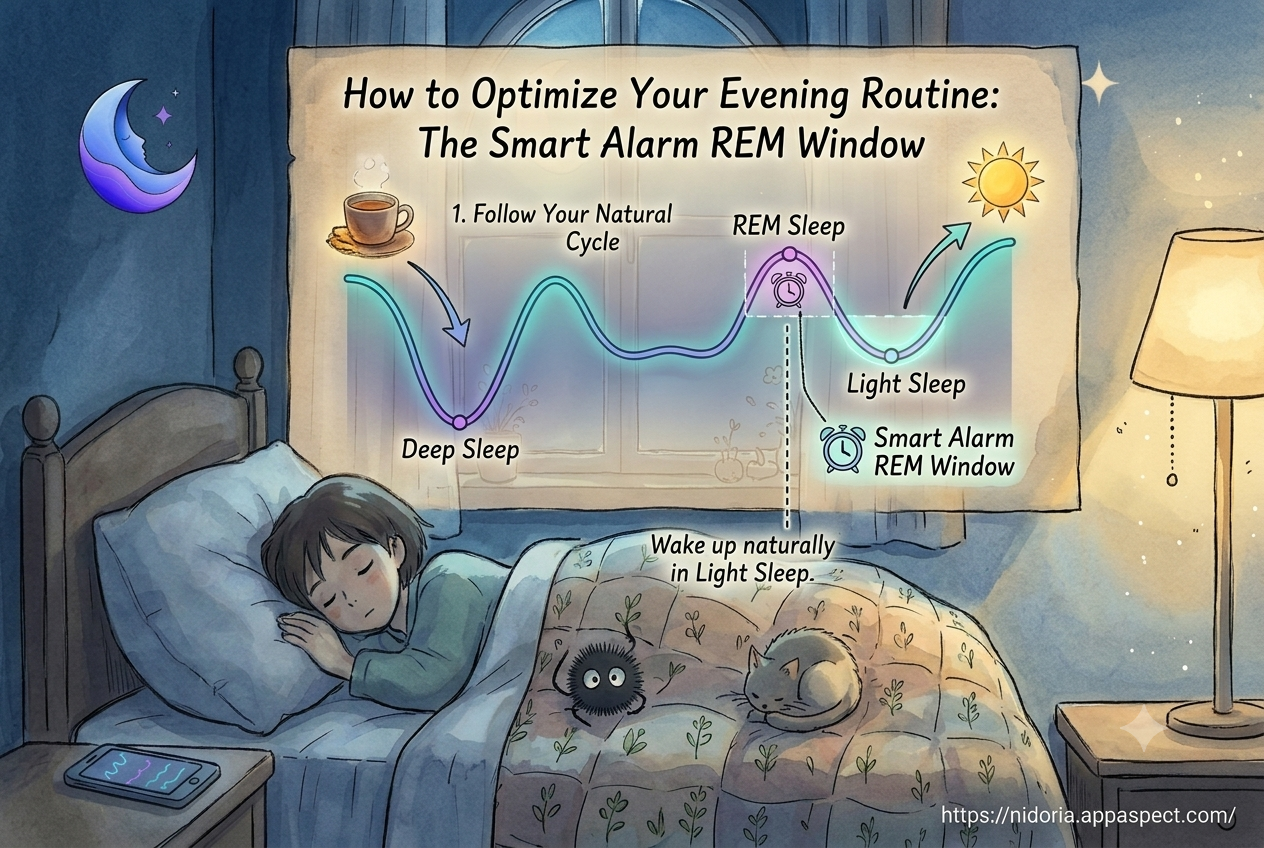
Answer-first: configure a smart alarm that wakes you during a light sleep window aligned with your REM patterns. Traditional alarms ignore the body’s natural cycles, jolting you out of deep sleep and triggering grogginess. A smart alarm that respects REM trends can shave off the “sleep inertia” most people feel after a hard-waking.
Here’s how to set it up using the data you already have:
- Identify the average REM start time from the past two weeks.
- Determine the average REM duration (usually 20-30 minutes).
- In Nidoria’s smart alarm settings, choose a wake-up window that begins 10 minutes before the average REM start and ends 20 minutes after the average REM end.
- Enable the “wake on light sleep” toggle so the alarm will fire at the optimal point within that window.
By aligning the alarm with your natural REM cycle, you’ll notice faster mental clarity and higher productivity levels. The Smart Alarm Guide for Productivity on Nidoria’s site explains why waking during light sleep can improve next-day focus, and the guide on “Why You Wake Up Groggy, and How a Smart Alarm Helps” provides deeper scientific context.
Use Nightly Sound Preferences to Boost Pre-Sleep Relaxation
Answer-first: select night sounds that match the acoustic profile of your most restful sleep periods. Sound is a powerful lever for pre-sleep relaxation, but not all sounds are created equal. Data from your sleep sessions often shows a correlation between specific soundscapes and reduced awakenings.
To harness this, follow these steps:
- Review the sleep sounds log in Nidoria and note which sound categories (rain, white noise, ASMR) correspond with the lowest number of nighttime awakenings.
- Test each preferred sound for a full week, keeping volume at a consistent 40-50 dB- loud enough to mask disruptive noises but soft enough to stay in the background.
- Record subjective sleep quality after each week in the app’s journal feature.
When the data points to a clear winner- for example, “rain” leading to a 15 percent drop in awakenings- make that your default pre-sleep soundtrack. The Rain, White Noise or ASMR? Choosing the Right Sleep Sound article on Nidoria offers a deeper dive into the science behind each option, helping you fine-tune your selection.
Adjust Light Exposure After Sleep Stage Insights
Answer-first: modify your evening lighting based on the timing of your deep-sleep and REM stages. Light exposure is the strongest cue for the body’s internal clock, and mismatched lighting can push REM later into the night, shortening overall restorative sleep.
Use the following framework:
- Pre-deep sleep (light stage) - Keep lights dim and warm (2700-3000 K). This signals the brain to transition toward deep sleep.
- During deep sleep - Turn off all sources of blue light; consider a smart bulb that automatically shifts to a red hue after 9 pm.
- Approaching REM - Introduce a very low-intensity amber light for 5 minutes to gently cue the brain that wake-up time is near, without disrupting the REM cycle.
Nidoria’s sleep stage analysis can automatically flag the exact minute when you typically enter REM, allowing you to schedule lighting changes via smart home integrations. Even if you don’t automate, a simple bedside lamp with a dimmer can be manually adjusted at the right moment.
Key Takeaways
- Review latency, awakenings, and REM onset each week to locate evening distractions.
- Configure a smart alarm that wakes you within a light-sleep window based on your REM trends.
- Pick night sounds that statistically reduce awakenings, then stick to a consistent volume.
- Adjust lighting to match deep-sleep and REM phases, using warm hues before deep sleep and amber cues before REM.
- Leverage Nidoria to visualize trends, log notes, and automate smart alarm and sound settings.
FAQs
How can I use my sleep tracker to improve my bedtime routine?
Start by exporting the nightly sleep stage breakdown, then identify patterns of high latency or frequent awakenings. Apply a wind-down checklist that targets those patterns- dim lights, silence devices, and log caffeine intake. Track the impact for two weeks and iterate.
What evening habits should I change based on REM data?
If REM consistently begins after 11 pm, shift your screen curfew earlier and reduce stimulating activities after dinner. Light exposure should transition to warm tones at least 30 minutes before the average REM start to encourage earlier REM onset.
Does adjusting smart alarm settings boost next-day productivity?
Yes. Waking during a light-sleep window aligned with your REM cycle reduces sleep inertia, leading to faster cognitive processing and better focus. Studies show a 10-15 percent improvement in reaction time when alarms respect sleep stages.
Which sleep sounds are best for winding down according to data?
Data-driven users often see the greatest reduction in awakenings with steady, natural sounds like rain or gentle white noise. ASMR can work for some, but it tends to be more variable; track your own response before committing.
How often should I review sleep trends to tweak my night schedule?
A bi-weekly review balances enough data for reliable patterns with timely adjustments. If you notice a sudden change- such as increased latency after a new workout routine- review immediately to adapt your checklist.
Conclusion
How to use sleep tracking data to optimize evening routine boils down to three core actions: analyze your sleep cycle for distractions, set a smart alarm that respects REM trends, and fine-tune sound and light to support pre-sleep relaxation. By turning raw numbers into a personalized wind-down checklist, you transform evenings from chaotic to calibrated, and mornings from groggy to goal-driven.
Call to Action with How To Use Sleep
Ready to start using data-driven sleep optimization? Nidoria gives you the tools to visualize sleep cycles, set smart alarms, and curate night sounds-all in one place. Get Started today at https://nidoria.appaspect.com/ and experience a calmer evening and sharper tomorrow.
Further Reading
- Sleep hygiene - Overview of habits that promote quality sleep.
- Circadian rhythm - How light exposure influences biological clocks.
- National Sleep Foundation: Sleep Environment - Guidelines for bedroom lighting and sound.
- CDC: Sleep and Sleep Disorders - Public health perspective on sleep quality.